Enterprise creative teams don’t lose time because they’re “disorganized.” They lose time because the system doesn’t match reality: multiple regions, multiple agencies, constant campaigns, and a steady stream of “can you prove who approved this?” questions.
Governance is how you keep speed and control, without turning your studio into an approval factory.
TL;DR
- Governance = clear roles + lifecycle states + traceable decisions for assets (not “more process”).
- Most enterprises fail by choosing between wide-open access or permission lockdown—you need a tiered model instead.
- Separate your world into Library (trusted), Workbench (in progress), and Distribution (approved/ready).
- Make “approved” and “retired” explicit states so outdated assets stop resurfacing.
- For video, treat masters, proxies, and cutdowns as related versions, and standardize timecode references for reviews and reuse.
- Buy/build with IT in mind: least privilege, audit logs, controlled sharing, retention, and admin simplicity.

Enterprise creative asset governance
Enterprise creative asset governance is the set of rules and structures that answer:
- Who can access or change an asset?
- What can they do (view, edit, share, publish)?
- Which version is the “right” one?
- When is it approved, and when is it retired?
- How do we prove it later (auditability)?
Security people call this “least privilege”—granting only the minimum access needed for the job. It’s a foundational principle in security guidance because it reduces risk and blast radius when something goes wrong (see NIST definition)
When enterprises actually need governance (and the warning signs)
If you're an enterprise creative org, you don't "grow into" governance gradually. You wake up one day and realize you already have it, just unofficial, and spread across tribal knowledge.
You need a governance model when:
- You support multiple brands, business units, or regions.
- You rely on external agencies, freelancers, production houses, or localization partners.
- You ship content across channels with real risk: brand, legal, privacy, licensing, regulatory.
- You’re being asked for evidence: who approved, when, what changed, what was shared externally.
🚨 Warning signs you’re there already:
- People ask for “the latest logo” weekly.
- Your folders contain multiple “final” files with no clear winner.
- Teams re-export the same video because nobody can find the right cut.
- Sharing happens via ad hoc links, and nobody knows who still has access.
What most orgs get wrong (and why it keeps happening)
Permission that are either too loose or too painful
Enterprises often swing between two bad extremes:
- Everything open: fast until the wrong asset leaks or the wrong file ships.
- Everything locked: safe-ish, but teams route around it (screenshots, downloads, shadow drives).
The fix isn’t “more restrictions.” It’s permission design that matches work:
- Most people need view access widely.
- Fewer people need edit access.
- Very few people should be able to publish/approve or change the “trusted” library.
Duplication, outdated assets, and version sprawl
Duplication is inevitable. The problem is unmanaged duplication:
- Multiple upload paths
- Re-exports for every channel
- Localized variants
- Agency deliverables arriving late and messy
“Approvals” without traceability
Approvals happening in email/chat are fast, but brittle. Six weeks later:
- “Who signed off on this?” becomes archaeology.
- You can’t prove what was approved versus what was later modified.
A governance model that scales: Library → Workbench → Distribution
Here’s the governance pattern that works in the real world because it mirrors how creative work actually flows.
Library (trusted source of truth)
- What lives here: approved brand assets, templates, evergreen footage, final deliverables, licensed media with usage notes.
- Who can edit: a small set of owners/stewards.
- Default behavior: stable, referenced, auditable.
Workbench (where making happens)
- What lives here: WIPs, explorations, drafts, review cuts, alternates, experiments.
- Who can edit: broader creative team + production partners as needed.
- Default behavior: high velocity, lots of versions, intentionally messy (but still trackable).
Distribution (ready for the world)
- What lives here: channel-ready exports, region-specific finals, campaign packages, press kits.
- Who can publish/share: restricted; often includes comms/brand/legal stakeholders.
- Default behavior: controlled sharing + clear expiration/retirement rules.
Role and access patterns that won't implode at scale
Define roles by responsibility, not job title. Keep it boring. Boring scales.
Recommended roles (start here):
- System owners (small): define policies, oversee governance model.
- Library stewards: curate trusted assets, manage lifecycle states (approved/retired).
- Creators/editors: create and iterate in Workbench, submit for approval.
- Approvers/publishers: final sign-off; publish to Distribution.
- External partners: scoped access to specific projects, time-boxed when possible.
Access patterns to standardize:
- Default view to trusted Library for the org (or by region/brand).
- Edit limited to project spaces.
- Publish reserved for the smallest group that can keep brand risk low.
This lines up with least privilege guidance from both security standards bodies and enterprise identity platforms.
Lifecycle states: draft → review → approved → retired
Governance becomes simple when every asset has a clear state.
Four states you can run tomorrow:
- Draft: not approved; may be incomplete or experimental.
- In review: stakeholders are reviewing; feedback is expected.
- Approved: safe to use; the “official” version.
- Retired: do not use; kept for history/legal reference.
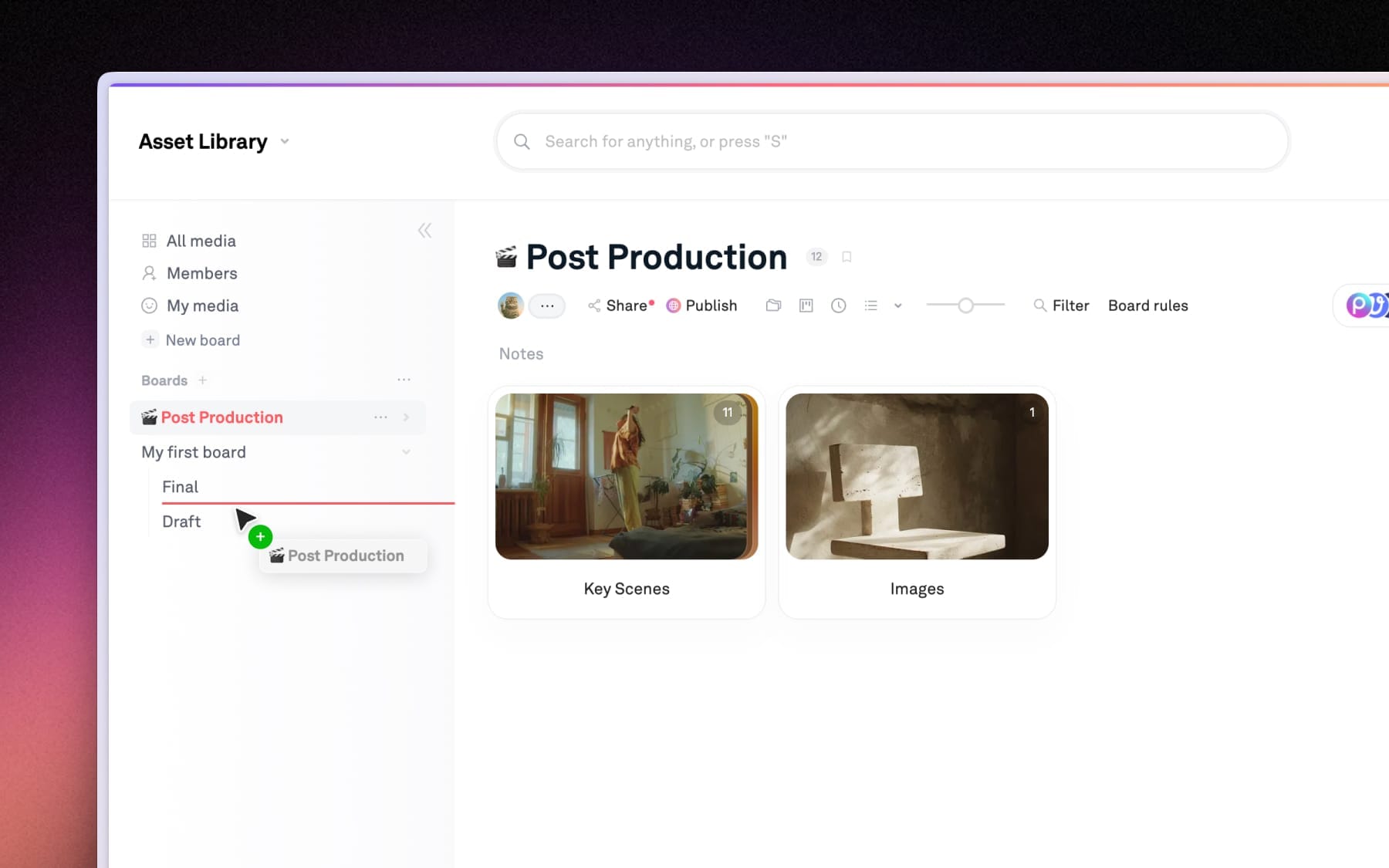
In Playbook: Reduce “wrong file” risk → separate approved from WIP using boards/collections
Use boards/collections to create a “Trusted Library” space and a separate “Workbench” space so WIPs don’t get mistaken for final deliverables.
Step-by-step governance maturity model (practical, not theoretical)
You don’t need a massive transformation. You need a progression with clear outputs.
Level 1 — Shared storage (baseline)
You have: folders, naming conventions, tribal knowledge.
Risk: outdated assets and uncontrolled sharing are constant.
Deliverable: a simple “source of truth” statement (where approved assets live).
Level 2 — Basic governance (roles + lifecycle)
You add: roles (owners/editors/viewers) and lifecycle states.
Deliverables:
- Role definitions
- Draft/Approved/Retired states
- A single “approved library” location
Level 3 — Scaled governance (region + agency-ready)
You add: regional delegates and external partner access patterns.
Deliverables:
- Regional ownership model
- External sharing rules (who, when, expiration expectations)
- “Distribution packages” per campaign
Level 4 – Auditable operations (procurement-friendly)
You add: audit expectations and log discipline. Audit log management is a recognized enterprise control area because it supports detection and investigation.
Deliverables:
- Audit trail expectations (who shared what, who approved what)
- Retention guidance (what must be kept, what can expire)
- Vendor checklist completed with IT/procurement
Level 5 – Optimization (reuse engine, especially for video)
You add: structured metadata, consistent versions, and “findability-first” workflows.
Deliverables:
- Metadata schema (brand, campaign, region, rights, status)
- Version grouping rules
- Video-specific standards (timecode, proxies, shot-level notes)
In Playbook: Make governance searchable → apply consistent tags/metadata across teams
Use tags/metadata to standardize the basics: brand, campaign, region, usage rights notes, lifecycle state (draft/review/approved/retired).

Evaluation criteria checklist (what to ask vendors + internal stakeholders)
Bring this to vendor demos and internal reviews. If a system can’t answer these cleanly, you’ll feel it later.
Governance + security
- Can we implement least privilege cleanly (view vs edit vs publish)?
- Can we scope access by brand/region/project without creating a permission labyrinth?
- Can we confidently control external sharing (partners, agencies, press, vendors)?
Auditability + compliance posture
- Is there a way to support audit trail expectations (who accessed/shared/published)?
- What’s the log story: collection, review, retention? (Audit log management is a common enterprise control focus.)
- Can we support procurement’s questions without hand-waving?
Workflow reality (creative teams will actually use it)
- Can teams preview assets quickly (especially large videos) without downloading everything?
- Can we keep WIP separate from approved without creating duplicate systems?
- Can we manage versions so “final” is a state, not a filename?
In Playbook: Avoid permission bottlenecks → use controlled sharing/publishing for Distribution assets
Use controlled sharing/publishing to limit who can publish/share “approved” deliverables externally while keeping internal iteration fast.
For video teams: stop scrubbing, start finding
Video governance gets painful because video is heavy, versioned, and time-based. Enterprises often govern images well and then treat video like an exception. That’s where budgets go to die.
The enterprise video reality you must design for
- A single campaign might include: master, mezzanine, proxies, social exports, localized variants, compliance edits, and platform-specific cutdowns.
- Review feedback is timecode-based, and timecode standards exist specifically to keep references consistent across frame rates and delivery contexts
Governance move: Treat video like a structured asset family, not a pile of files.
Practical model:
- Master: protected, limited editors
- Proxy: broadly viewable for review and fast access
- Cutdowns: grouped under the same “parent” with clear lifecycle states
- Exports: Distribution-ready packages with controlled sharing rules
Why metadata wins (even when the team is busy)
For video, metadata isn’t “nice to have.” It’s the difference between:
- reusing an approved shot in 2 minutes, or
- re-editing from scratch because nobody can find it
Video metadata that pays off fast:
- Project / campaign / brand
- Deliverable type (master/proxy/cutdown/export)
- Version/cut name + date
- Usage rights notes
- Key moments (timecode ranges): “product reveal,” “CEO quote,” “end card”
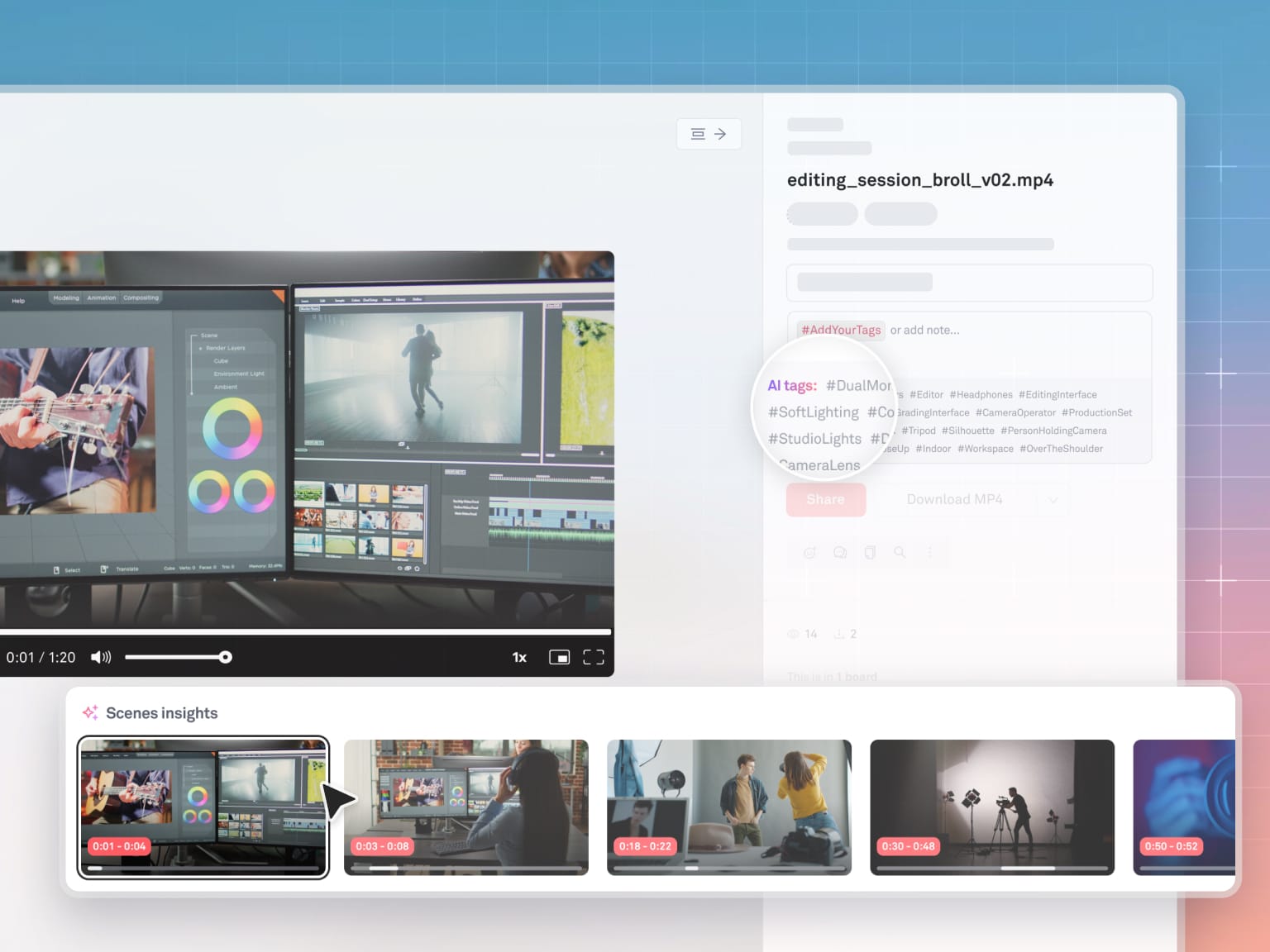
In Playbook: Speed up video review → use fast preview for video so stakeholders don’t download
Use fast preview for images + video so reviewers can quickly check the right cut, confirm brand elements, and move approvals forward without everyone downloading large files.
Common pitfalls (and how to avoid them)
- Building a permissions maze
If governance requires a spreadsheet to understand, people will route around it. Start with 4–6 roles max. - Treating every asset as equally final
Separate Workbench from Library. Make “Approved” a destination, not a vibe. - Forgetting external partners until the first emergency
Agencies need scoped access patterns from day one. “Just email it” does not scale. - Never retiring anything
Retired assets are a safety feature. “Keep everything forever” is not the same as “make it usable.” - Video exceptions that become the rule
If video has no version model, it becomes a parallel universe. Bring it into the lifecycle.
What good looks like (copy/paste checklist)
Governance outcomes checklist
- We have a Trusted Library location that contains only Approved assets.
- WIPs live in a Workbench area and are clearly not the source of truth.
- Every asset has a lifecycle state: Draft / In review / Approved / Retired.
- Roles are defined and mapped to access: view / edit / publish / admin.
- External partners get scoped access to specific projects, not the whole universe.
- We can answer: who shared what, and when (audit expectations).
- Duplication is managed: we can identify the current approved version.
Video-specific outcomes checklist
- Video assets are organized as families (master/proxy/cutdown/export).
- Reviews reference timecode consistently.
- Key moments are searchable via structured metadata (even if minimal).
- Reuse is a workflow, not a hope: we can find prior shots/cutdowns quickly.