
Frame.io and Playbook both serve creative teams but they're built for different parts of the workflow.
Frame.io is the industry standard for video review and collaboration, with frame-accurate commenting, Camera to Cloud, and deep Adobe integrations that make it a go-to for video production teams. If your world is entirely video — from shoot to final cut — Frame.io is purpose-built for that.
But many teams find that video is just one part of what they manage. When your workflow also includes brand assets, photography, design files, PDFs, campaign libraries, and client-facing deliverables, you need a home base for all of it, not just the footage.
That's where Playbook fits in. For teams that have outgrown video-only tools, or need a central creative hub beyond the edit suite, Playbook picks up where Frame.io leaves off.
And for teams who love Frame.io for review but need a stronger home for everything else? These tools can work together.
Playbook vs. Frame.io
More than a video review tool — a home base for your entire creative library
| Playbook | Frame.io | |
|---|---|---|
| Pricing and accessibility | ||
| Pricing | Starts at $12/mo with 3 included members | Starts at $15/member/mo |
| Free plan | Has a basic free plan and offers team free trial | Has a basic free plan |
| Onboarding | ||
| Ease of getting started | Self-serve. Start immediately. No sales calls required. | Self-serve onboarding for most plans |
| Migration & Implementation | Instant import from Google Drive, Dropbox, and more. Start same day. | Best for teams already in the Adobe ecosystem |
| Feature set | ||
| Core product | Digital Asset Management (DAM) + creative workflow platform | Video review, collaboration, and approval platform |
| AI capabilities | AI-powered image and video search, smart tagging, OCR, scene detection, and built-in AI chat | Transcription and captions for video; less focus on AI-powered asset discovery |
| Search experience | AI-powered conversational search across all file types — find images, video, PDFs, and docs | Strong video-specific search; limited AI search across non-video assets |
| Search → action workflow | Find, organize, tag, group, share, and publish in one place | Strong for video review actions; less built for organizing broader asset libraries |
| Asset management | Built for videos, images, Adobe files, PDFs, docs, and full campaign libraries | Optimized for video; non-video asset management is limited |
| Video workflows | Strong support for previewing, collaborating on, and managing videos alongside other assets | Best-in-class video review with frame-accurate comments and Camera to Cloud |
| Tagging and metadata | Flexible tags + custom fields + editable AI tags across all asset types | Account-level metadata for video; less flexible for non-video file types |
| Collaboration & review | Comments, approvals, workflows, and collaboration built into one workspace | Excellent video review and approval; frame-accurate commenting |
| Sharing and presentation | Share links, branded pages, templates, and presentation-ready publishing | Review and presentation links for video; limited brand portal capabilities |
| Brand portals | Publish branded client galleries and asset portals directly from your library | Not designed for external brand portals or client asset delivery |
| Video frame search | Find an exact moment in footage with shot-level, natural language search | Timestamp-based navigation; no natural language shot search |
| Scene insights | AI extracts shot-level metadata across 16+ categories on every upload | Not available |
| 3D asset review | Full-fidelity browser-based 3D review with coordinate-level feedback (Enterprise) | Not available |
| UGC & social video | Centralize, review, and approve UGC and social video alongside all creative assets | Focused on scripted production; less suited to high-volume UGC workflows |
| Supports AI-powered search | Yes — conversational search with built-in AI chat to find and act on any asset | Limited to video transcription search |
| Creative workflow support | End-to-end workflows: organize, review, share, publish, and present | Focused on review and approval within the video production pipeline |
Why Teams Choose Playbook
Frame.io solves video review. But most creative teams manage far more than footage — photography, design files, brand assets, PDFs, and campaign libraries all need a home too. If you're using Google Drive or Dropbox to fill the gaps around Frame.io, that's exactly the problem Playbook solves.
Playbook gives you a single, searchable library for your entire creative output, with AI-powered search that works across every file type. You can find "product photos with gold packaging shot on white background," create a shareable board from the results, and send it to a client — all without leaving your workspace.
Teams that outgrow video-only tools find Playbook gives them a single source of truth for their entire creative output.
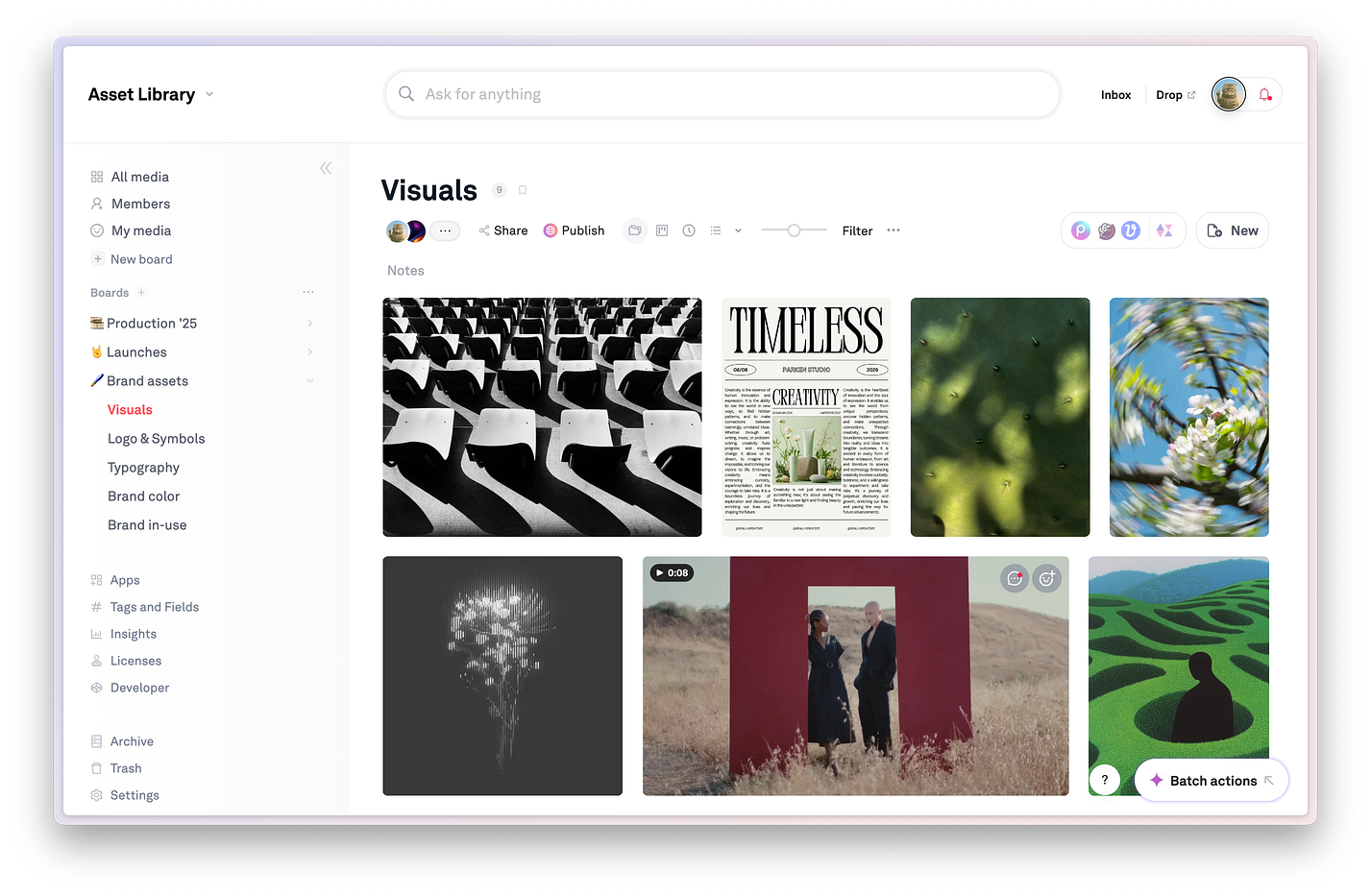
Frame.io offers video transcription search. Playbook's AI works deeply across images and videos.
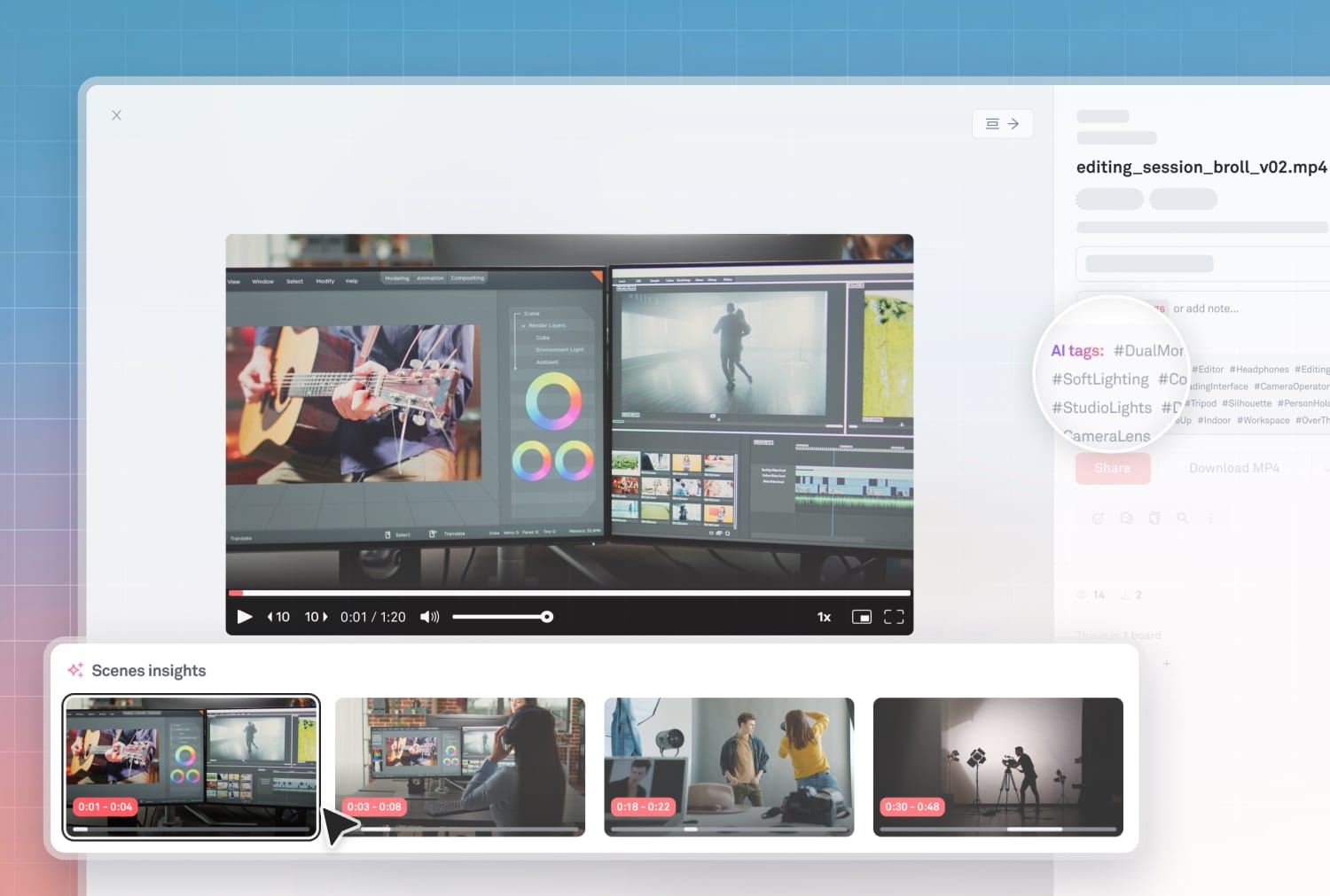
With shot-level search, you can find an exact moment in your footage by describing the scene: "find scenes where a person is walking through a crowded market at night." Playbook surfaces matching shots across your entire archive instantly, without scrubbing through clips. Scene Insights automatically extract metadata across 16+ dimensions on every upload — camera angle, scale, motion, lighting, subject, environment — so your footage is fully indexed the moment it lands.
Beyond search, Playbook Intelligence lets you act on results directly: add tags, remove backgrounds, batch-organize, or create a shareable board, all from a prompt built into your workspace.
👉 AI becomes a thought partner and execution layer, not just a search index.
Frame.io is designed around scripted production from shoot through a review pipeline. But agencies and consumer brands deal with a different kind of volume: UGC submissions, creator-sourced clips, and social videos that need to be reviewed, selected, approved, and redistributed fast.
Playbook centralizes all of it alongside your core brand library — incoming creator content, campaign assets, and approved finals — in one shared workspace. Teams can review, react, comment, and approve without jumping between tools.
Dorst & Lesser, a 75-person content agency, switched to Playbook to get a scalable, searchable library for exactly this kind of content volume. Their team now manages social assets and UGC across 75+ marketers in a single workspace.
"Playbook is genuinely one of the most intuitive tools you could use for doing anything creative. Whether it is organizing assets, creating new assets, or working with clients or creators, it's made our lives a lot easier. The team is also very responsive to feedback and features are added/updated quickly. Most importantly the team are easy to work with and very kind."
— Sam, Swipelabs
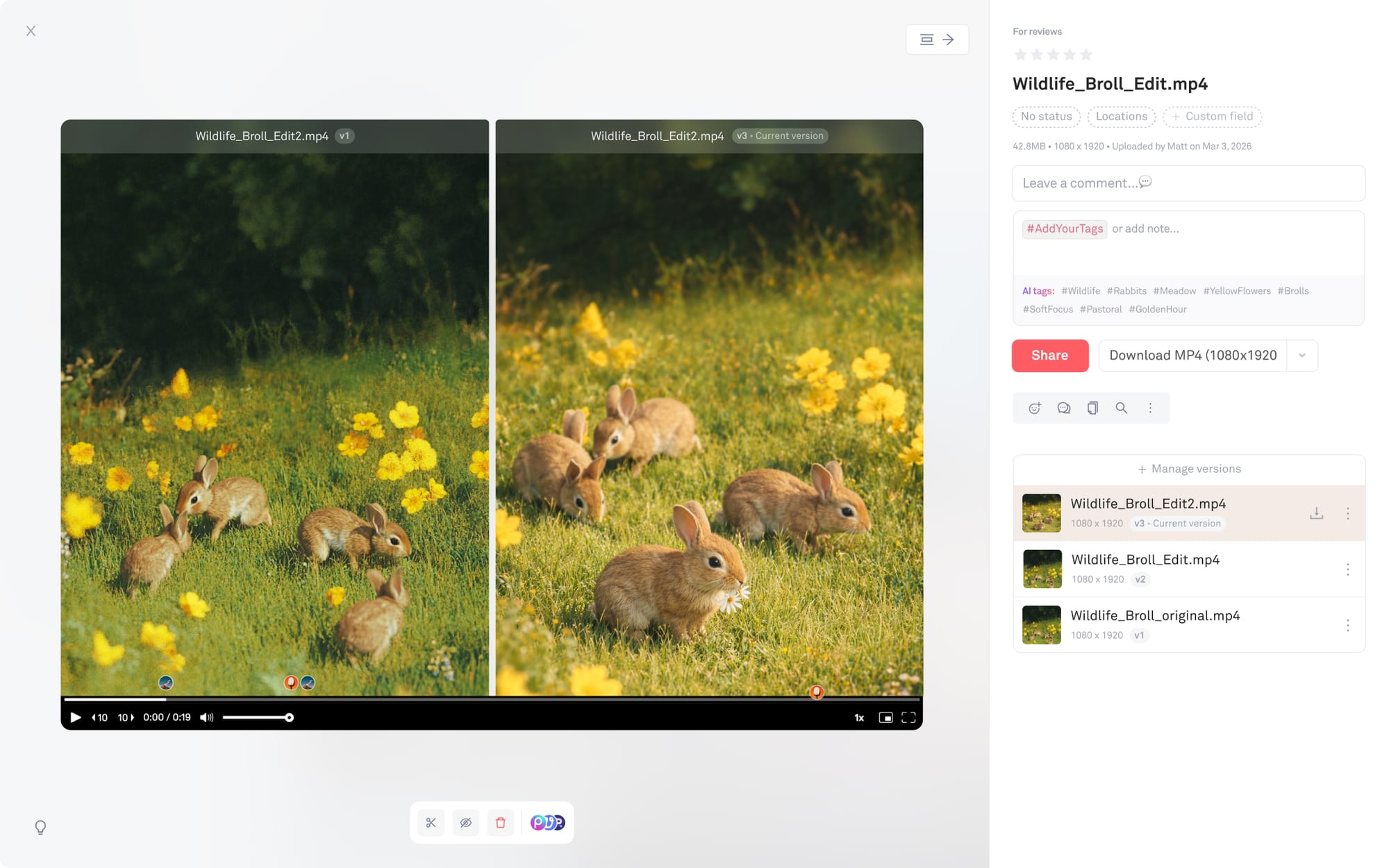
Playbook supports end-to-end video management alongside all other asset types: preview and scrub footage in the browser, collaborate with frame-level comments, compare versions side by side, and organize footage across shoots, edits, and final deliverables.
For production studios and media & entertainment teams , Playbook also supports browser-based 3D asset review (Enterprise): rotate, inspect materials, and pin feedback to exact spatial coordinates — no DCC tools, no proxy exports, no GPU hardware per reviewer.
Frame.io is designed for internal review and approval. When it's time to share finished work with clients, partners, or retail distributors, you need something more polished. Playbook lets you publish branded client galleries and asset portals directly from your library, using ready-made templates — no extra tools, no manual exports.
For creative teams, this extends to full brand governance: locked boards, custom metadata rules, advanced permissions, and cross-team access controls that let distributed teams self-serve on approved assets without every request running through a central creative queue.
Frequently asked questions
What is the best Frame.io alternative for digital asset management?
Playbook is a strong Frame.io alternative for teams that need more than video review. It combines AI-powered search across all file types, smart tagging, visual asset organization, review and approval workflows, branded client delivery portals, and campaign management — built for creative teams, agencies, and brand teams managing photos, videos, design files, and more.
How does Playbook compare to Frame.io?
Frame.io is built primarily for video review and collaboration, with frame-accurate commenting and deep Adobe Creative Cloud integrations. Playbook goes further with AI-powered search across all asset types, a full DAM for managing images, design files, PDFs, and campaigns, branded client portals, and a Business plan with API and SDK access for custom integrations. For teams producing more than video content, Playbook provides the broader creative infrastructure that Frame.io isn't designed to offer.
Can I use Playbook and Frame.io together?
Yes. Many teams use Frame.io for video review within the Adobe ecosystem and Playbook as their central creative hub for finished assets, brand files, photography, and client delivery. They complement each other well as Frame.io handles the review pipeline, Playbook handles everything else.
Does Playbook have video collaboration like Frame.io?
Playbook supports video preview, scrubbing, time-stamp and position commenting and collaboration alongside other asset types. For teams whose primary workflow is frame-accurate video review within Adobe Premiere or After Effects, Frame.io remains a best-in-class tool for that specific use case. Playbook is designed for teams who need strong video management and a home for the rest of their creative library.
Is Playbook free to try?
Yes. Playbook offers free trials for the Team and Business plans. See full pricing at playbook.com/pricing.